
Topographic Mapping: What It Shows Before You Build
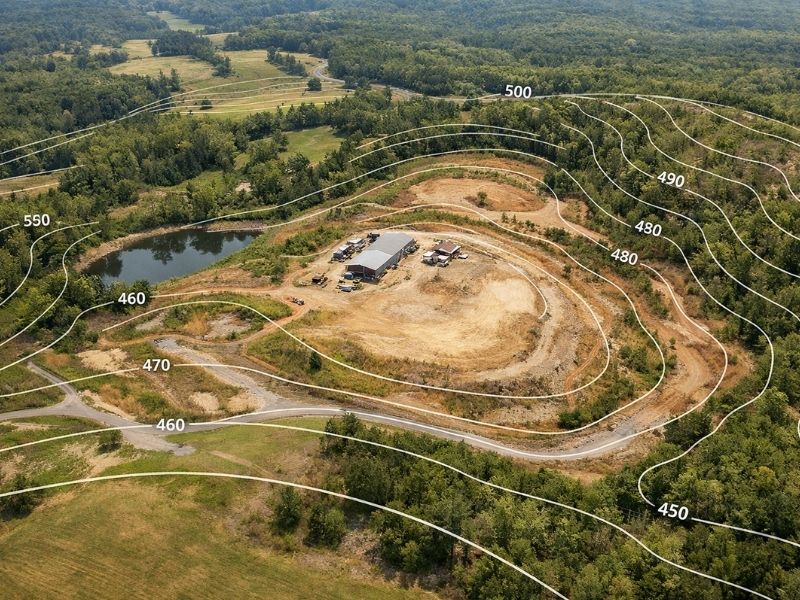
Developers get surprised by drainage problems, permit rejections and grading cost overruns more often than they should. Most of those surprises show up in topographic mapping data that was never ordered before design work started. Get the map first. Build from real numbers.
What Topographic Mapping Shows on a Site
Topographic mapping produces a detailed picture of the land surface. Not a photo. Not a rough sketch. A measured, data-driven record of what the ground actually does across the full property.
That record covers three things that matter before any design work begins.
Elevation and Contour Lines
Contour lines connect points at the same elevation. When lines sit far apart, the ground slopes gently. When they bunch together, the slope is steep.
On flat sites, contour lines may be spaced several meters apart. A developer looking at that map might assume drainage won’t be a problem. Sometimes that’s right. Often it’s not, because flat land concentrates water in low areas instead of shedding it.
Drainage Paths and Low Points
Water follows the lowest available path. Topographic mapping shows exactly where those paths run across a site. It also shows where depressions sit. These are the spots that collect water and hold it after rain.
On undeveloped land, depressions aren’t always visible during a site visit. Grass, vegetation and uneven lighting hide them. The elevation model doesn’t.
Existing Features on the Ground
A topographic map also records what’s already on the site: trees, drainage channels, retaining structures, utility markers and any existing improvements. That information feeds directly into the site design. A tree with a large root zone near a planned building pad changes the grading plan. A drainage channel running across the site changes where infrastructure can go.
How Developers Read a Topographic Map
A topographic map isn’t hard to read once you know what to look for. The two main elements are contour lines and spot elevations.
What Contour Lines Tell You
Each contour line represents a set elevation. The interval between lines (called the contour interval) is shown on the map legend. A 0.5-meter contour interval means each line represents a half-meter change in elevation.
Closely packed lines mean a sharp grade change. Wide spacing means flat ground. Where lines form closed loops, there’s either a hill or a depression. The map will indicate which.
Spot Elevations and Why They Matter
Spot elevations are specific elevation readings taken at key points: building pad corners, drainage inlets, low points, driveway entries. They give exact numbers where contour lines give general shape.
Engineers use spot elevations to calculate cut and fill volumes, design drainage slopes and confirm finished floor levels. Without them, grading estimates are guesswork.
What Topographic Mapping Catches That Walkthroughs Miss
A site walkthrough tells you what the land looks like. Topographic mapping tells you what it does. Those are different things.
Hidden Depressions
A depression that’s 20 centimeters deep and 10 meters wide won’t stand out during a walkthrough. After rain, it holds water. After grading starts, it can redirect runoff toward a building pad or a neighboring property.
The elevation model shows it before any of that happens.
Drainage Direction Problems
On sites with subtle grades, the direction of drainage isn’t obvious by eye. The topographic map calculates flow direction across the full surface. If runoff naturally moves toward the planned building footprint, that gets fixed in the grading design, not after the slab is poured.
Grade Changes Near Building Pads
A building pad needs to sit above surrounding grade so water drains away from it. If the natural ground near the pad is higher on two sides, water will concentrate toward the structure regardless of how the pad itself is graded.
Topographic mapping shows that problem before the design is set. Changing a grading plan in software takes hours. Fixing a drainage problem on a finished site takes weeks and significant money.
How the Data Feeds Into the Build
Topographic mapping isn’t just a reference document. Engineers and designers pull from it directly.
Site Grading Plans
The grading plan is built on top of the topographic survey. Engineers calculate how much soil needs to move, where it goes and what the finished surface will look like. Without an accurate base map, those calculations rest on assumptions. Assumptions produce change orders.
Stormwater and Drainage Design
Stormwater design depends on knowing how water currently moves across the site. The topographic map gives engineers the surface model they need to size drainage infrastructure correctly: pipe diameters, inlet locations, detention pond volumes and outfall grades.
Get the surface model wrong and the drainage system won’t perform the way it was designed.
Permit Documentation
Most local authorities require a drainage plan before issuing a grading or building permit. That plan has to be based on accurate elevation data. A topographic survey from a licensed surveyor produces the documentation needed to support the application.
Submitting without it means delays. Submitting with the wrong data means rejection and a new survey anyway.
When to Order Topographic Mapping
Order it before the site design starts. Not during. Not after.
The earlier the elevation data comes in, the more the design can work with the actual terrain. Grading volumes stay lower. Drainage design is more accurate. Permit submissions go in cleaner.
Ordering a topographic survey after the design is drafted means one of two things: the design gets revised at cost, or the project moves forward on data the design team never actually had.
Neither outcome is good. The survey cost is fixed. The cost of redesigning around bad site data is not.
Frequently Asked Questions
What does topographic mapping show that a boundary survey doesn’t?
A boundary survey shows where the property lines are. Topographic mapping shows the shape of the land inside those lines: elevations, slopes, drainage paths and existing features. Most development projects need both. They answer different questions.
How accurate is topographic mapping for site design work?
Accuracy depends on the method used. Ground-based surveys and drone LiDAR surveys both produce high accuracy results, typically within 2 to 5 centimeters vertically for drone-based work and tighter for ground surveys. That level of precision is enough for grading design, drainage engineering and permit documentation.
Can topographic mapping data be used directly by engineers?
Yes. The standard deliverable is a CAD file (.dwg or .dxf) that engineers and site designers load directly into their software. It contains contour lines, spot elevations and existing features. Ask for this format when ordering the survey. A PDF alone is not enough for design work.
How long does a topographic survey take to complete?
Field work on a standard development site typically takes one day or less. Processing and drafting takes 3 to 7 business days after the site visit. Total turnaround from order to delivery is usually 1 to 2 weeks depending on site size and scheduling.
Does topographic mapping need to be updated if the site has been partially graded?
Yes. Any grading work changes the surface. A topographic survey completed before grading won’t reflect the current conditions after earthwork starts. If significant grading has occurred since the original survey, a new one is needed before drainage design or permit submissions are finalized.